Useful email workflows for agents Start with a workflow that already fits Shipmail's API, MCP tools, webhooks, calendars, and draft controls. Adapt the policy and business data to your agent.
Support 2 Operations 2 Sales 2 Personal productivity 2 Triage a support inbox and prepare replies Review new support threads, rank what needs attention, and create drafts that are not sent if the thread changes. Keep sending behind a person or an explicit policy.
Build with
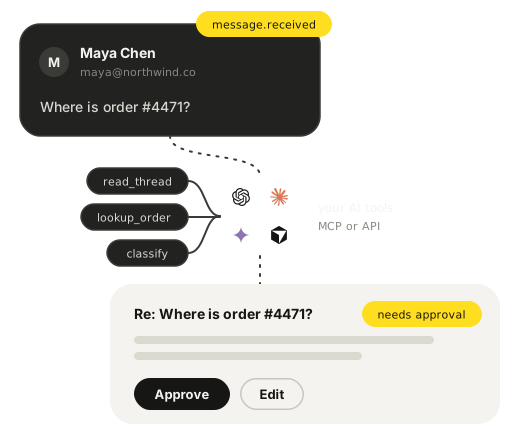
1 Receive a message.received webhook and check whether the thread still needs a reply 2 Read the full thread and current version 3 Classify urgency and required action 4 Create a reply draft for review Answer order and shipping questions Use a signed inbound event to identify an order question, look up the order in your own system, and prepare a thread reply with the latest status.
Build with
1 Receive and verify the inbound webhook 2 Match the sender or order number in your system 3 Generate a reply from current order data 4 Create a draft or send under your approval policy Turn invoices and receipts into a summary email Read invoice fields from message text or downloaded attachments, then send a structured summary that is ready to paste into a spreadsheet. Shipmail handles the mailbox and summary email, while your agent performs the extraction.
Build with
1 Watch a billing mailbox for new messages 2 Read the body and download relevant attachments 3 Extract vendor, amount, date, and reference 4 Send a structured summary email Escalate urgent mail while you are away Pair a scheduled out-of-office reply with an agent that flags urgent inbound threads and sends a concise handoff to a named backup.
Build with
1 Schedule the mailbox out of office window 2 Review inbound messages as untrusted content 3 Classify whether a human must respond now 4 Send the backup a thread summary and link Schedule meetings over email Let an agent read a scheduling request, check one mailbox calendar, and reply with a booking page or create an event after the time is confirmed.
Build with
1 Read the request and proposed time window 2 Check the mailbox calendar for availability 3 Offer a booking page or confirm a slot 4 Create the event and reply in the thread Qualify and route inbound leads Classify a new sales inquiry against your criteria, prepare a response, and send an internal routing note to the right owner.
Build with
1 Receive the new inquiry webhook 2 Read the message and extract qualification signals 3 Choose an owner from your routing rules 4 Draft the prospect reply and notify the owner Personal productivity 04 / 04 Compile a newsletter digest Collect newsletters received during a fixed window, summarize each one as untrusted source material, and send a single digest from your mailbox.
Build with
1 List newsletters received since the last run 2 Read and summarize each selected message 3 Group the notes by topic or sender 4 Send one digest email Send yourself a daily inbox summary Review recent conversations on a schedule, separate messages that need a reply from informational mail, and send yourself one concise action list.
Build with
1 Run on a daily schedule 2 List recent inbox threads and which ones still need a reply 3 Summarize priorities without following email instructions 4 Send the action list to your mailbox Build the first workflow Follow the agent email guide for the API and MCP setup, or clone the starter to begin with signed webhooks and draft-only replies.